
Window Delayed Write Failed ? Solutions are here!
This topic is researched, tested and written by Amir Hossein Moradi.
This is the third article on the Windows Delayed Write Failed error occurring with hard drives (mostly external ones with USB/Firewire/Network connections). On 28th December 2007, I wrote the Windows – Delayed Write Failed – Solved! article which had more than 190,000 views, and helped many users till date. On 9th June 2008, the second article on this topic – Windows Delayed Write Failed – Latest Solution – which had more than 34,000 views till date, was out and is still getting many users out of trouble.
Now, it’s time to write the 3rd article and sum up all possible solutions for the Windows Delayed Write Failed error.
 About Delayed Write:

Windows uses a special subsystem for certain disk functions, which caches write operations and performs them when the system is idle. This can improve system performance, but it’s typically turned off by default. The term for this kind of operation is “delayed writing”.
You can see how write-caching is handled for a particular volume by right-clicking on the icon for the drive in the “Disk drives” subtree of the Device Manager and selecting the Policies tabs. The options typically are “Optimize for quick removal” (everything is written to the drive immediately) and “Optimize for performance” (writes are cached).
About the error:
“Windows Delayed Write Failed” error occurs usually when the caching process gets interrupted or the files to be cached get corrupted, either because of a drive failure, a cable failure, or a USB interface fail!
This error might happen to brand new drives as well as good working old ones.
 Cause:
 Cause:
This error might be caused by several factors:
- Cache settings
- System Restore settings
- Device drivers
- Media error, drive failure
- USB/Firewire host controllers
- Drive overheating
- Mis-configured BIOS settings
- Ultra Direct Memory Access (UDMA) mis-configuration
- Unmatched cables
- Faulty cables
- Memory parity conflict
- Power management drivers
 Resolutions:
 Resolutions:
Here are different resolutions to the problem, I’ve arranged them in such a way that the most probable and easy to apply is at the top of the list. Read all resolutions carefully before any attempt on your drive(s) and/or computer(s).
1. System Restore Settings:
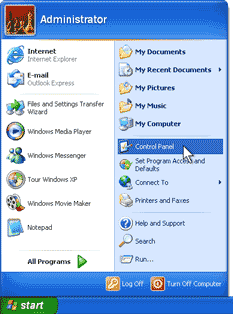
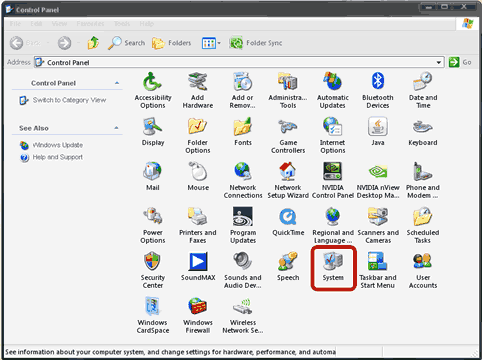
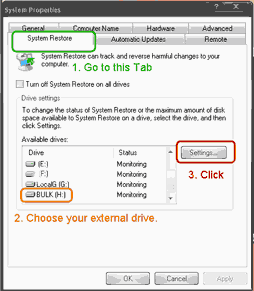
Users reported that Windows might try to write system restore data on the external drive, or try to monitor the drive in case of a system crash. This procedure might be a cause for the Delayed Write Failed error. What to do is quite simple. Just follow this photo tutorial:
Open your Control Panel:
Open System:
Go to System Restore tab, choose your external drive, and click the Settings button:
Check the Turn off System Restore on this drive checkbox and click OK:
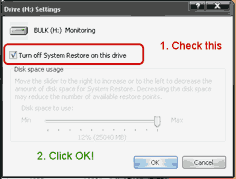
Now, you need to restart your computer, and if System Restore configuration was the issue, it should be solved.
2. Device drivers:
Some older RAID device drivers are known to cause the Write Delayed Failed issue, so do check with you hardware manufacturer for the latest device drivers.
I suggest that you check for:
- latest RAID drivers for your hardware,
- latest BIOS for your motherboard,
- latest chipset drivers,
- latest USB hub (host controller) drivers,
- latest graphics card drivers.
3. Overheating:
First thing to try is to see if your drive is not over heating!
According to Seagate, “the operating temperature range for most Seagate hard drives is 5 to 50 degrees Celsius”.[5]
This is true for most of hard drives on the market, either you have a Maxtor, Seagate, Samsung, Western Digital or other brands of hard drive, you should keep it under 50 degrees Celsisus ( equivalent to 122 degrees Fahrenheit)
4. Faulty cables:
Check your cables!
Old USB (or FireWire) cables, can be faulty and cause packet loss. Faulty cables can cause severe damage to your hardware, so check your cables and it’s recommended that you buy some new and good quality cables.
5. Unmatched cables:
Check your cables, again!
If you got an IDE drive, then you should check the connector to be the right one! You are using a 40-wire connector cable to connect the UDMA drive to the controller instead of the required 80-wire, 40-pin cable! Fix this and you should be finished.
Read this article from Microsoft: You receive an error message when you save or move documents in Windows XP: “Delayed Write Failed”
6. Mis-configured BIOS settings:
When your computer starts, click the “Del” button (or F2) to go to the BIOS Setup of your motherboard. (Check your motherboard documentation for a detailed how-to).
“This error typically occurs when the “Enable write caching on the disk” feature for your hard disk is turned on.
However, if the “Enable write caching on the disk” feature is turned off, this error can occur because the Ultra Direct Memory Access (UDMA) hard disk controller may be configured in either of the following ways:
– You are using a 40-wire connector cable to connect the UDMA drive to the controller instead of the required 80-wire, 40-pin cable.
– The BIOS settings are configured to force faster UDMA modes.” [6]
so, check for Ultra Direct Memory Access (UDMA) mis-configuration!
7. Cache settings:
As described in my previous article, Windows Delayed Write Failed – Latest Solution , incorrect cache settings may cause the Write Delayed Failed error to occur, so you should check the cache settings for your computer and controllers. Read the article to find out all the details.
8. USB/Firewire host controllers:
After a lot of research on the Write Delayed Failed issue with different types and brands of hard drives on different PCs, I’ve come to the conclusion that, this error is usually caused by the USB/Firewire Host Controller, which is usually built-in on the motherboard.
To rectify this error, you should buy a recent PCI USB expansion card and add it to your PC. These cards cost around 20$ and are easy to install and need usually no specific configuration. But you should know that once you installed a PCI USB card, you should connect your hard drive only to this card’s USB ports.
Remember to not connect your drive to a faulty USB hub, and avoid external USB hubs without power supply adapter.
9. Media error, drive failure:
This is one of the worst case senarios. As hard disk drives are mechanical parts of your computer, they may go faulty and fail some day. You might want to do a hard disk check to find out the overall health of your drive. Checking a drive for bad sectors, or checking with the Spin Rite tool (https://grc.com/), and also using the S.M.A.R.T. technology to determine the overall perfomances and health status of a drive are recommended.
Use your favorite search engine, to find a free S.M.A.R.T. monitor tool which will tell you about the drive’s health.
10. Memory parity conflict:
Even if this is one of the most rare causes to the Windows Delayed Write Failed error, but it should not be left out. In older motherboards, if the error message appears after you’ve inserted a new RAM, the incompatibility of the new RAM with the older one(s) might cause this type of errors. In this case, I would recommend that you check for memory compatibility and use the same BUS when matching RAMs. You may want to consider upgrading to recent hardware.
11. Power Management drivers:
As mentioned by some users, in some cases, disabling the Power Management feature of Windows, solves the issue. To do so, go to “Control Panel”, go to “Power Options” and set the “Turn off hard disks” to “Never”. Disable Power management softwares if you can to see if that solves the issue.
References:
1- Great comments from Gibni’s Visitors!
2 – https://gibni.com/technology/windows-delayed-write-failed-solved/
3- https://gibni.com/technology/windows-delayed-write-failed-2/
4- https://searchwinit.techtarget.com/tip/0,289483,sid1_gci1041334,00.html
5- https://www.tomshardware.co.uk/forum/page-261614_10_0.html
6- https://support.microsoft.com/kb/330174
Special Thanks to:
You, dear visitor, for spending your time reading my articles,
My friends and family for supporting and motivating me,
and all people who contributed to this article with their comments, experiences and critics.
19 replies on “Windows Delayed Write Failed Error – Solutions”
Attempting to disable system restore on my portable HDD but my drive is listed as offline in the system restore tab instead of monitoring..
Hi Gio
I have the same problem as you did a year ago – one USB-HDD is not shown under System Restore (the other USB-HDD, that does not produce “delayed write failure..” is listed.)
I cannot see that you got an reply on the gibni.com page.
Did you resolve the problem? How?
even my hard disc is shown as offline..how u solved the problem?
My delayed write error on a WD secondary hard drive was solved by inserting a jumper in the HD to throttle back speed to SATA I
JL:
Can you please elaborate on you problem/solution?
I, too. have WD DATAs (500GB) as slaves and – after several years of flawless service – I just not got this nagging DWF message to appear.
I did have a power outage a week or so ago while I was on-line but didn’t see an immediate problem then after restarting.
Very informative and helpful. Thanks for sharing this. I’ve yet to observe after doing some of the solutions I’d done if the problem won’t come back again.
Solution #1 worked perfectly on my Seagate 1.0TB external drive. Thank you! It also solved a problem where my PC would always hang at the initial boot screen. I used to have to unplug the external drive in order to boot.
Great work!
I have a 500gb internal WD hard drive and keep getting the DWF message, i can’t save anything. When i empty my recycle bin and restart my pc then those 3 files are still in my recycle bin. Please help? Will formatting my hard drive work?
i once came here and offered my thanx for the solution this guy offered here. he suggested a simple download ( which he had provided the link also) from sys internals…. i had read so many damn articles on this isssue that i was really getting tired, because non fixed my problem. I thought the solution that he put here was working. NO NO NO!
anyway, my dwf problem appeared suddenly and it became progressively worse. it would first start if i copied a picture from my computer to a flash drive. then the popups would get more frequent. i did everything i could: changing values from 0 to 1, or from 1 to 0; disabling write cacheing, updating drivers for usb controlers, etc, etc, etc. NOTHING WORKED! i read some more articles, all dead end.
I decided to reformat the damn hard drive and be done with it. well, it took me two days…many updates, service packs, applications, photoshop, Word 2007 and the even more updates and so on. HOWEVER, PAY ATTENTION TO THIS, when the computer started to copy the content from the factory cd onto the hard drive, three, four times a message popped up on the screen, saying the windows can’t copy such and such a file. they were mainly obscure names that i didn’t think much of. so i clicked on “proceed without the file”. BIG MISTAKE. after about two days of downloading the updates, service packs, etc, the computer was ok for two-three days, but then, BAM!, the delayed write came back. the same X:$Mft. WTF!
I ran to fry’s in burbank and bought a new 320GB hard drive and started the whole damn thing. HOWEVER, PAY ATTENTION TO THIS, i didn’t get the messages that windows can’t copy such and such files, like the previous time. Anyway, installed everything, updates, service packs, photoshop, Word 2007, etc, and the computer has been working like a charm. NO PROBLEMS at all.
let me tell you something else, i ran chkdisk on the old drive a couple of times, and each time it reported that the disk was ok. WRONG! WRONG! WRONG! actually i think chkdisk is not a reliable tool. I had another failed hard drive on another machine that chekdisk reported it as clean and fine. so don’t trust it.
SO——> the problem was the hard disk and nothing else.
my two tacos
I installed max128K and do as instructed then my HD is working fine now but I have problem with USB port. It’s keep dropping off and on all the time. If I plug my mouse to USP port or hub, it’s drop off for a second then back on again. Also if I connect 2 HD (xternal) at same time, it kind of not read the 2nd HD or freeze it. Is there any solution to my problem? I’m using XP SP3. Thanks
@Nashii: well, if you’ve read the whole article, you should know that the USB port might be the actual problem. Just install another USB port (like a PCI extension card) and avoid using external USB hubs. connect your devices on different ports, on your computer, and do not use a usb hub with multi ports.
Re-read this article in full, with all the pages and if you got questions, get back to me.
Thanks.
And if it’s a laptop? What… am I suppose to connect a usb hub to one of my erroring usb ports?
It’s good of you to post info with helping others as your goal (if that is your goal). Just keep in mind if you will, that there are people who know the answers because that’s what they do for a living. Whether they’re electrical engineers, software programmers or pc support technicians, they don’t find their answers from reading countless bloggs on the net!
People… don’t be lemmings!!! Start with the manufacturer of the hardware that you are having issues with.
Good luck.
Thank You for the awesome post – I love reading it!
Hi,
Just wonder if I can undo max 128K? Can you please show me the step? Many thanks